 Made in DeveloperHub
AI Agent helps editors draft and revise documentation pages by turning a conversation into proposed page edits. It supports similar writing workflows to AI Writer, but it can also search and reference the documentation in your current documentation version to produce more informed, page-specific edit suggestions.
AI Agent never applies changes automatically. Instead, it produces one or more edit suggestions that you can review and apply selectively.
Who can use AI Agent
AI Agent is available to all editors except reviewers. It requires a plan with AI features and the AI writing agent setting turned on (see below).
To enable the AI Agent:
Open Project Settings → AI Features.
Turn on AI writing agent. The same setting also enables AI Writer and the AI Agent in the API Editor.
Click Save changes in the top menu.
Where to find AI Agent
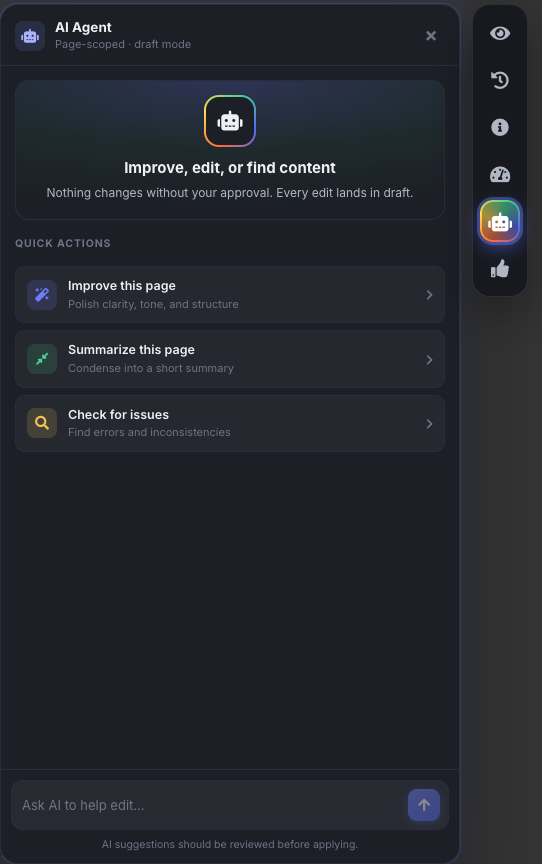
On any page, select the AI Agent button in the floating dock on the right of the editor. It sits alongside Edit history, Page info, and Readability.
You can modify AI Instructions from Project Settings → AI Features.
What AI Agent can do
When you open the panel on a page, it offers three quick actions: Improve this page, Summarize this page, and Check for issues. You can also ask for anything else in your own words.
AI Agent can help you:
Draft new pages
Revise or rewrite existing text
Audit content
Generate summaries
Translate a page
Plan content (for example, outlines and section suggestions)
Restructure a page (for example, reorder sections and improve flow)
AI Agent returns changes as edit suggestions that can include structured blocks. It handles blocks automatically when proposing edits.
How AI Agent works
AI Agent is scoped to the page you opened it on, but it can use the rest of your documentation for context:
It can see the current page, including any unsaved changes.
It can search the same version you are viewing, including drafts and unpublished pages.
It can read the pages it finds and reference recently published pages, so new content matches your existing style.
AI Agent produces proposed edits that are scoped to the current page. You can apply any suggestion you want, and skip the rest.
AI Instructions
You can add AI Instructions to control how AI Agent responds. For example, you can ask it to:
Use a specific language (for example, British English)
Use a specific tone (for example, friendly and direct, or more formal)
Follow a style guide (for example, sentence length, preferred terminology, or avoiding jargon)
Format output in a particular way (for example, what to bold, whether to use lists, or whether to include examples)
If your instructions conflict with each other, AI Agent will do its best to follow the most specific instruction.
Write in British English. Keep the tone concise and practical. Use short paragraphs and bullet lists. Bold UI labels and button names.
Why use DeveloperHub's AI Agent (vs third-party AI agents)
Using DeveloperHub's AI Agent inside DeveloperHub has practical advantages over using a third-party AI agent to generate documentation edits:
Correct page syntax and blocks: AI Agent is aware of our page syntax and capabilities (including the supported blocks and inline blocks). Third-party agents typically do not have this reference, and may hallucinate blocks or attributes that do not exist.
Correct internal links: AI Agent can link to your documentation pages accurately in the current documentation version. Third-party agents may try to guess links by combining slugs, which can produce broken or incorrect links.
Applying edit suggestions
AI Agent shows each proposed change as a diff of what would be removed and added. You can then:
Select Apply on a suggestion to apply it to the page
Apply suggestions selectively (you do not need to apply all suggestions)
Applied suggestions update the page in draft mode:
Applying a suggestion updates the draft content on the page.
The draft is not saved automatically.
You can review and edit further before saving or publishing.
Privacy
Conversations with AI Agent are personal and are scoped to the page. Your conversation history is kept locally in your browser.
AI Agent vs AI Writer
AI Agent and AI Writer both help with writing and editing, but they are designed for different workflows.
Feature | AI Writer | AI Agent |
|---|---|---|
Where you use it | Inline while editing | From the AI Agent button in the floating dock on a page |
Primary interaction | Inline assistance | Conversational workflow that produces edit suggestions |
Access to documentation context | Only highlighted text | Can search and reference documentation in the current version, including drafts and unpublished content |
Output | Writing assistance inline | One or more edit suggestions you can apply selectively |
Applies changes automatically | Yes | No |
Notes and limitations
AI Agent cannot modify page info (slug, description, etc...).
AI Agent cannot generate images.
What data is sent to the LLM?
The current page's content is sent to the LLM, along with any pages the agent reads or finds while working on your request. Large pages may be condensed first.