 Made in DeveloperHub
Your data is your data. You can always export it at any time.
We provide project exports in two formats:
Markdoc: Use if you wish to re-import the data into DeveloperHub later with no data loss.
Markdown: Use for external purposes.
You can export the whole project, a single version, or an individual page. A version can also be exported to PDF.
Markdoc
Markdoc is the markdown-based format DeveloperHub uses for pages. When a project is exported, and imported back, Markdoc allows the following to be retained:
All the published and draft text in each page.
All the blocks in each page with every configuration and detail.
The order of the pages.
Categories and external links.
Documentation settings.
Exporting a Project
To export a project:
Open Project Settings → Import & Export.
Click the export format you want. The active project will be exported.
It will take a few seconds, and a download will start. The downloaded file is a compressed file (zip) containing all versions, documentations, API references, and indices of the documentation. The structure of the file is as such:
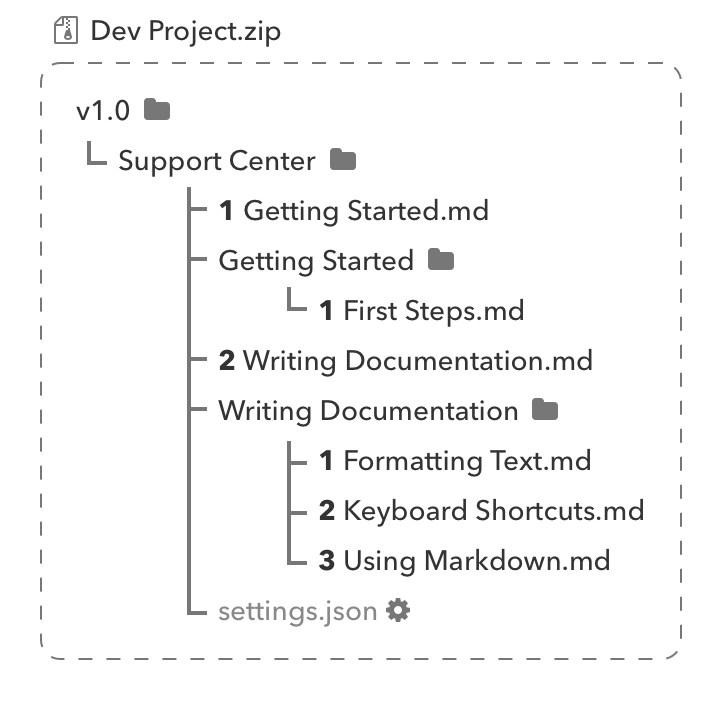
To learn how to import this export back into DeveloperHub, check Importing Documentation.
Exporting a Version
You can also export a single version on its own:
Open Manage Versions (version menu → settings cog).
Select the version.
Under Lifecycle, choose Export as Markdoc for a full-fidelity zip you can re-import with no data loss, or Export as Markdown for a portable zip for external use.
The download is a zip named after the version, containing that version's documentations, pages, and API references. Project-wide changelogs are not included in a single-version export; use a project export if you need them.
The same card also offers Export as PDF (see PDF Export).
Exporting a Page
To export a page:
In the documentation index, select the page to be exported.
Click on Export under the title.
Choose the export format: Markdoc, Markdown or Word.
If you plan to re-import the page into DeveloperHub later with no data loss, use Markdoc format.
Exporting Images
To export the images you have in your DeveloperHub project, follow these steps:
Get a markdown export of your project first.
Unzip the export.
Use our tool mdimg which finds all the URLs in the export and downloads the images. You can find already built binaries for linux and mac in the releases.