 Made in DeveloperHub
You can customise your docs using Custom CSS and Custom Javascript. Below are some of the most used customisations:
Hide version selector/picker
Hide section/documentation selector/picker
Make top navigation sticky
Only apply this customisation for the original UI. For Next UI, there's a setting under Project Settings > Customisation to enable it.
When navigation is sticky, the scrolling behaviour must be modified in order for headings not to hide under the navigation when it is scrolled to. Add the following to Custom HEAD tags to modify scrolling offsets:
Decrease top navigation links font-size
Use if the titles are too long and they're breaking into two lines.
Move index and table of contents to edges of screen
This is enabled by default now.
Set theme automatically according to user preferences
Place in Custom HEAD tags. Only use one of the if conditions.
Append contact us to search box on no results
Place in Custom HEAD tags.
Hide version warning banner for a specific version
Place in Custom HEAD tags.
Collapse Section Picker into Dropdown on Next UI
Place in Custom CSS.
Blur Top Navigation Bar
Place is Custom CSS. You might need to handle light theme separately.
Adding Icons to Index
To add an icon in place of the expander icon for categories and parent pages in the index, add such CSS:

Expanding Enum in API Reference
To have enums with their varnames expand on click, add the following in Custom HEAD tags:
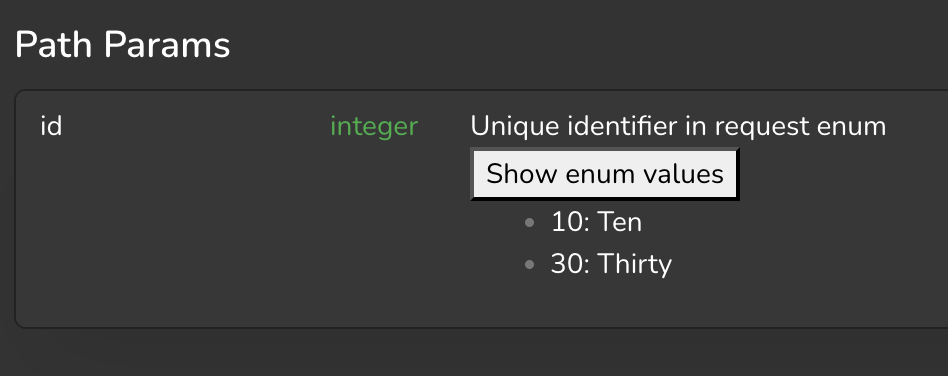
You may modify the CSS as needed for the button using the CSS selector .customise.live .references .expand-enum-vars.
Add Dropdown to Navigation Links
To create a dropdown which you can add to navigation links in the top navigation bar, use this javascript:
Use the code above as such:
Add a Fading Edge to References
To add a fading edge to references, use the following javascript:
Redirect to Documentation in Latest Version
If you wish for a documentation to only be view-able in the latest version, add the following Custom HEAD tags:
Indent Index under Category
To add indentation under category, add the following to Custom CSS:
Move Search Bar to Landing Page Hero
To move the search bar to a hero element with selector .docs-hero-content in the landing page, add the following to Custom HEAD tags:
If you're using Next UI, use app-search-v2 instead of app-search.